Best Retirement Planning Software Canada: 2026 Comparison
RetireZest, Optiml, ProjectionLab, MaxiFi & Canada.ca compared on 2026 published price, free tiers, and features — so you can pick the right Canadian tool.

There's no single "best" retirement planning software for every Canadian — the right tool depends on whether you want a free quick check or a paid deep-dive, whether you own a corporation, which province you live in, and how hands-on you want to be. This guide lays out the main options so you can compare them yourself.
How to read this comparison. We build RetireZest, so this is a vendor's roundup — and importantly, it's a comparison of published facts (pricing, free tiers, stated features, and country focus), not a hands-on review. We haven't independently tested every tool, so we've stuck to what each company publishes on its own site and left subjective "which feels better" judgments to you. Always verify current details directly with each vendor before deciding.
Quick comparison (2026)
| Tool | Free tier | Paid price (published) | Notes |
|---|---|---|---|
| RetireZest | Yes — permanent, no credit card | $47/yr or $9.99/mo CAD | Canada-focused (all provinces & territories, incl. QPP); models corporate (CCPC) accounts |
| Optiml | 14-day trial | $99–$499/yr | Canada-focused; corporate planning listed in its top tier |
| ProjectionLab | Yes (Basic, $0) | $129/yr or $549/yr (Pro) | Supports multiple countries including Canada |
| MaxiFi Planner | Not listed | ~$109–$149/yr USD | US-based company; check its site for Canadian coverage |
| Canada.ca calculator | Yes (free) | Free | Official CPP/OAS income estimate |
All figures are as published by each vendor in 2026 and may change — verify directly before buying. We have not independently tested these tools; this reflects what each company states on its own site. Confirm currency, features, and pricing with each vendor.
RetireZest
Our own tool, so we can speak to it directly. RetireZest runs a year-by-year simulation under 2026 Canadian tax rules, compares withdrawal strategies, and stress-tests with Monte Carlo. Results are summarized in a 0–100 Zest Score across four pillars — plan survival, lifetime tax cost, retirement cushion, and spending reliability — so the number isn't just a grade: it shows where your plan is weakest and points to the biggest opportunity to improve, which you can then test by adjusting your inputs.
- Facts (retirezest.com/pricing): Permanent free tier with full simulations, no credit card (not a trial); paid plans $47/year or $9.99/month — the lowest paid price among the tools listed here; models corporate (CCPC) accounts with eligible/non-eligible dividends, CDA, and RDTOH; supports Quebec QPP; plain-language education built in.
- Worth knowing: The tax engine models all 13 provinces and territories in full, each with its own 2026 brackets and credits. It's a newer tool than some on this list.
Optiml
A Canadian DIY planning tool that, per its site, describes itself as "Canadian retirement planning software that stress-tests your life's 'What-ifs' to build a tax-efficient retirement plan." Its site lists goal-based optimization — "Maximize After-Tax Estate", "Minimize Lifetime Taxes", "Maximize Retirement Spending", and "Set Estate Goal" — alongside an AI assistant it calls Eva. (On whether a general-purpose chatbot can do this job on its own, see can ChatGPT plan my retirement?)
- Facts (optiml.ca/pricing, checked 2026-08-23): No permanent free tier — a 14-day trial, then three annual plans: Essentials $99/yr, Pro+ $249/yr, and Legacy $499/yr. Per that page the trial gives "full access to ALL features across ALL plans." Corporate and holding-company planning — trusts, HoldCo assets, shareholder loans, and stand-alone operating companies — is listed in the Legacy tier.
- Worth knowing: access starts with the 14-day trial rather than a permanent free tier, so the practical question is whether two weeks is long enough for you to work through your own numbers. If you own a corporation, note which tier carries the corporate features for your situation.
RetireZest vs Optiml
Both tools present themselves as Canada-focused and both model corporate accounts, so the differences that tend to matter are how you get access, what it costs, and which tier carries corporate planning. Comparing what each company publishes:
| RetireZest | Optiml | |
|---|---|---|
| Free access | Permanent free tier, no credit card | 14-day trial; no permanent free tier listed |
| Paid price | $47/year or $9.99/month | $99, $249, or $499 a year across three plans |
| Corporate (CCPC) | Modelled on every tier, including the free one | Listed in the Legacy tier ($499/yr) |
| Approach | Year-by-year simulation with a strategy comparison and a single readiness score | Goal-based optimization presets, per its site |
Which one suits you depends less on a verdict than on your situation:
- You want to work through your numbers over weeks, not days. A permanent free tier lets you come back as things change; a 14-day trial sets a clock. Many people find retirement planning is something they revisit rather than finish in one sitting.
- You own a corporation and are watching the budget. RetireZest models CCPC accounts — eligible and non-eligible dividends, the Capital Dividend Account, and RDTOH — on the free tier. Optiml lists its corporate features in the $499/yr Legacy plan. If corporate planning is the reason you are looking, that gap is worth pricing out.
- You want optimization presets that pick a strategy for you. Optiml's site leads with named goals such as maximizing after-tax estate or minimizing lifetime taxes. RetireZest compares withdrawal strategies side by side and shows the trade-offs, which is a different way of arriving at a similar question.
Where RetireZest is the newer tool. We launched more recently than several tools on this list, so we have a shorter public track record. Our Monte Carlo stress testing, PDF reports, and CSV export sit behind the paid plan rather than the free tier. And we have not tested Optiml hands-on — everything above comes from its published pages, so check the current details yourself before deciding.
ProjectionLab
A planning tool that, per its site, supports multiple countries including Canadian inputs (CPP, OAS, RRSP, TFSA, and provincial tax), with scenario modelling and Monte Carlo.
- Facts (projectionlab.com/pricing): Free "Basic" tier; paid plans at $129/year (Premium) and $549/year (Pro).
- Worth knowing: Because it spans several countries, it's worth confirming on their site that the Canadian features you need are covered.
MaxiFi Planner
A planning tool built on an economics "consumption smoothing" approach. We include it because Canadians often come across it. MaxiFi is a US-based company, so if you're in Canada it's worth checking directly whether it covers the Canadian benefits and tax rules you need.
- Facts (maxifi.com/pricing): Paid plans about $109–$149/year (USD) for Standard/Premium.
- Worth knowing: Confirm Canadian coverage (CPP, OAS, provincial tax) on MaxiFi's site before relying on it for a Canadian plan.
Free government calculator (Canada.ca)
The Canadian Retirement Income Calculator gives a free, official estimate of your CPP and OAS income.
- Facts: Free and official. It estimates government benefit income; it does not compare withdrawal strategies, optimize tax across account types, run Monte Carlo, or produce a year-by-year drawdown plan.
- Worth knowing: Useful as a first benefit estimate before using a fuller planning tool.
How to choose
Rather than rank them, here are the factual distinctions to weigh:
- Want to start free? RetireZest and ProjectionLab both list free tiers; Canada.ca is free for a basic estimate. Optiml and MaxiFi do not list a permanent free tier.
- Own a corporation? RetireZest models CCPC accounts on every tier; Optiml lists corporate planning in its top tier.
- Live in Quebec? RetireZest lists QPP support; confirm QPP handling with any tool you consider.
- Want a Canadian-focused tool? RetireZest and Optiml present themselves as Canada-focused; ProjectionLab supports several countries including Canada; MaxiFi is US-based — check each tool's Canadian coverage directly.
- Lowest published ongoing price for a full planner? RetireZest at $47/year, of the tools listed here.
A note on Canadian-specific depth. Because Canadian retirement math runs on rules that don't exist elsewhere — CPP/QPP timing, OAS clawback, GIS, RRSP-to-RRIF conversion and minimums, TFSA mechanics, and CCPC/holding-company taxation — a tool's country focus matters. Per their own sites, RetireZest and Optiml present as Canada-focused; ProjectionLab supports Canadian inputs alongside several other countries; MaxiFi is US-based, so its Canadian coverage is worth confirming directly. None of this ranks the tools — it's simply the dimension a Canadian plan lives or dies on, so it's worth checking which rules each tool actually models for your situation.
The honest path: try a free option first to learn your own numbers, then test a paid tool yourself before committing — published feature lists are a starting point, not a substitute for trying it.
Frequently asked questions
Is there a free Canadian retirement planning software? Yes. Based on each vendor's published plans, RetireZest offers a permanent free tier with full simulations and no credit card (not a trial), and ProjectionLab offers a free "Basic" tier. Canada.ca's official calculator is free for a basic CPP/OAS estimate. Optiml lists a 14-day trial rather than a permanent free tier, and MaxiFi does not list a free tier.
RetireZest vs Optiml — what's the difference? Both present themselves as Canada-focused and both model corporate (CCPC) accounts. The main published differences: RetireZest lists a permanent free tier and paid plans at $47/year, and models CCPC accounts on every tier; Optiml lists a 14-day trial with paid plans from $99–$499/year, with corporate planning in its top ("Legacy") tier. Verify current details on each site.
Is ProjectionLab good for Canada? Per its own site, ProjectionLab supports several countries including Canadian inputs (CPP, OAS, RRSP, TFSA, and provincial tax). Because it spans multiple countries, it's worth confirming on their site that the specific Canadian features you need are covered.
What's the cheapest paid retirement planning software in Canada? Of the tools listed here, RetireZest lists the lowest published ongoing price at $47/year. Optiml lists $99–$499/year, ProjectionLab $129/year (Premium), and MaxiFi about $109–$149/year (USD). Prices are as published in 2026 and may change — verify directly.
Sources
All competitor facts above are drawn from each vendor's own published pages, checked June 2026. Verify current details directly, as pricing and features change.
- RetireZest — pricing
- Optiml — pricing
- ProjectionLab — pricing
- MaxiFi Planner — pricing
- Government of Canada — Canadian Retirement Income Calculator
Frequently asked questions
What is the best retirement planning software in Canada?
There is no single best tool for everyone — it depends on your needs, and the right comparison is of published facts rather than untested opinion. RetireZest is a free, Canada-focused option that includes corporate (CCPC) and Quebec QPP support, with paid features at $47/year. Optiml is Canada-focused ($99–$499/year, 14-day trial). ProjectionLab supports multiple countries including Canada (free Basic tier; $129/year or $549/year Pro). MaxiFi is a US-based tool — check its site for Canadian coverage. The Canada.ca calculator is free for a basic CPP/OAS estimate. Verify current details with each vendor.
Is there a free Canadian retirement planning tool?
Yes. RetireZest has a permanent free tier with full year-by-year simulations and no credit card. ProjectionLab offers a limited free version, and the official Canada.ca Retirement Income Calculator is free for a basic CPP and OAS estimate. Optiml and MaxiFi do not list a permanent free tier.
RetireZest vs Optiml — what is the difference?
Both present themselves as Canada-focused and both model corporate accounts. The main published differences are access, price, and which tier carries corporate planning. RetireZest lists a permanent free tier with full simulations and no credit card, with paid plans at $47/year or $9.99/month, and models CCPC accounts on every tier including the free one. Per optiml.ca/pricing (checked August 2026), Optiml lists a 14-day trial rather than a permanent free tier, with plans at $99, $249, and $499 a year, and corporate and holding-company planning in the $499 Legacy tier. Verify current details on each site before deciding.
Which retirement software is best for Canadian business owners?
RetireZest models corporate (CCPC) accounts — eligible and non-eligible dividends, the Capital Dividend Account (CDA), and RDTOH — on every tier, including the free one. Optiml includes corporate planning in its higher-priced tiers.
How much does Canadian retirement planning software cost in 2026?
Prices range widely. RetireZest is free to start, then $47/year or $9.99/month. ProjectionLab has a free Basic tier, with paid plans at $129/year (Premium) or $549/year (Pro). MaxiFi is a US-based tool at about $109–$149/year USD. Optiml is $99–$499/year depending on features. The Canada.ca calculator is free.
Try the Canadian option on this list
Run a full simulation free — CPP, OAS, provincial taxes, and 8 withdrawal strategies on your own numbers.
Try RetireZest freeThis article is for educational purposes only and does not constitute financial, tax, or legal advice. Pricing and features for third-party products are as published by those vendors in 2026 and may change — verify directly. Always consult a licensed financial advisor before making financial decisions.
Related Articles

How RetireZest Helps You Learn — Education First, Always
RetireZest helps Canadians understand CPP, OAS, taxes, and withdrawal strategies through simulation. Educational tool, not financial advice.
What Is RetireZest? Canadian Retirement Planner Explained
RetireZest is a free Canadian retirement planning tool that models CPP, OAS, GIS, RRSP, RRIF, TFSA, and corporate accounts under 2026 tax rules.
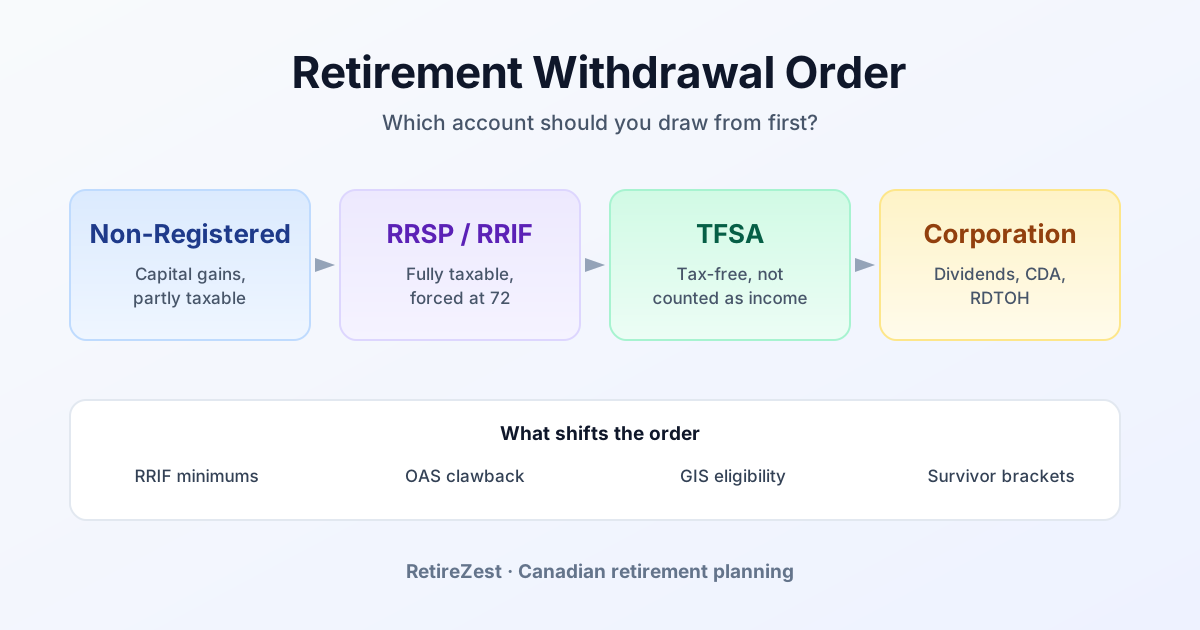
Retirement Withdrawal Order in Canada — Which Account First? (2026)
RRSP, TFSA, non-registered, or corporation first? The conventional order often doesn't fit. See what shifts it — OAS clawback, GIS, RRIF minimums, survivorship.